

Expires 31/01/2027

From here you can select your 2026 Senior membership, complete your registration form, and pay your fees. For the club's main website, please visit www.thorvertoncc.co.uk.
We will be permitting members to pay by monthly standing order if this is preferred. Cost will be roughly equivalent to full membership price (eg £9 x 12 monthly payments for a full member). Please contact Jack Stirling by e-mailing jfgstirling@gmail.com if this is something you would like to do. The club retains the right to withdraw this offer if payments are not met each month.
The club's commitment to keeping cricket accessible to all, the club's committee has agreed to set aside a Hardship Fund for those in disadvantaged financial positions. Please send a confidential e-mail to Jack Stirling to discuss in confidence.
For senior & student memberships in 2026, you will receive a new playing shirt (either coloured or white depending on which team you most regularly play for).
If you are looking to pay membership for under 18s, please visit our juniors membership page here.
Memberships
This season we are offering the following Senior memberships:
Registering a membership (new members)
To register a membership, click on the 'Join Us/Renew' button in the righthand box at the top of this page and fill out the membership form. If your membership type includes free Social membership for your spouse/partner and/or child(ren)/dependent(s) and they wish to take advantage of that, please add their name (and, if they want to be contacted about club matters in their own right, their email address) on the second page of the registration form under 'Additional Linked Members'.
Renewing a membership (previous members)
To renew your membership, click on the 'Join Us/Renew' button in the righthand box at the top of this page and then click the 'Sign In' link in the second line of text in the top box. If you previously created a password with your membership account, use that and your email address to sign in. If you did not create a password, click on 'Sign In without password' and use just your email address to sign in. You will then be able to access your previous membership details and renew your membership (see the instructions below for a reminder of the payments process). Please make sure you update any account information that may have changed — e.g. email address, contact number, home address — it is very important that we have up-to-date information on record.
Club Policies and Codes of Conduct
As part of your membership registration, you will be asked to confirm that you accept the responsibilities that derive from the Club's formal Policies and Codes of Conduct. Please make sure that you have read and understood both documents before you complete your registration. The Policies can be found here, and the Codes of Conduct here. When the registration process is completed, you will receive a confirmation email with a copy of both of these documents attached.
Payments
Payments for membership are now standardly processed online via PayPal, but you do not need to have a PayPal account to make your payment (see details regarding PayPal Guest Checkout below). PayPal is an e-commerce and online payment service that is owned and operated by eBay. It is used by millions of people worldwide. You can learn more about PayPal here. If you already have (or want to create) a PayPal account you can use that to pay, but if not, you can pay by credit/debit card without signing up to PayPal.
If online payment poses a particular problem and you would like to discuss other payment options, please contact the Senior Membership Contact (Jack Stirling) via the email address listed in the box on the right of this page.

When you have completed your membership form, click on the 'Select Payment' button (which will look like this:  )
)
You will see that the option to pay via Paypal is pre-selected (it will look like this:  )
)
Clicking the 'Pay with PayPal' button will transfer you to the PayPal page (the button will look like this:  )
)

 Once you have been directed to PayPal, you can select to login a PayPal account if you already have one, to create one if you would like to or to simply pay as a 'guest' using a credit or debit card. If you do not want to create an account with PayPal, then select the option 'Check Out as a Guest' (see the image on the right <–– )
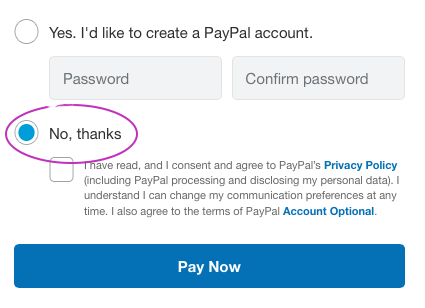
With PayPal Guest Checkout you just fill in your card details and then select 'No, thanks' at the bottom of the page where it asks if you'd like to create an account (see the highlighted section in the image below).
Problems and Enquiries
If you have any queries about the membership application process or encounter any difficulties processing your application, please contact the Senior Membership Contact (Jack Stirling) using the email address in the box in the top right of this page or via telephone on 07395 507 929.
Thank you for your interest in membership. Together we can make 2026 an enjoyable and successful season at Thorverton.
Powered by
membermojo
